

 Ajax toolkit
Ajax tutorials
Ajax toolkit
Ajax tutorials
|
|
13.1. Programming SMO WMI ClassesFigure 13-1 shows the relationship between SMO classes used with the WMI Provider for Configuration Management. This section shows how to programmatically use SMO WMI classes. The examples in this section are all built using Visual Studio 2005. You need a reference to the following assemblies to compile and run the examples: Figure 13-1. SMO classes used with the WMI Provider for Configuration Management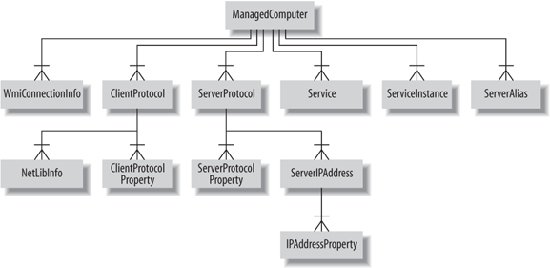
Additional assembly references will be indicated for examples in which they are required. 13.1.1. Enumerating the WMI InstallationThis example demonstrates how to instantiate a ManagedComputer object and iterate through its hierarchy of collections to enumerate information about the WMI installation. The example lists client protocols, connection settings, server aliases, service instances, and services on the local machine.
    using System;
    using System.Data;

    using Microsoft.SqlServer.Management.Common;
    using Microsoft.SqlServer.Management.Smo;
    using Microsoft.SqlServer.Management.Smo.Wmi;

    class Program
    {
        static void Main(string[] args)
        {
            ManagedComputer mc = new ManagedComputer(  );

            Console.WriteLine("-Client Protocols-");
            foreach (ClientProtocol cp in mc.ClientProtocols)
                Console.WriteLine(cp.DisplayName + ": " +
                    (cp.IsEnabled ? "Enabled" : "Disabled"));

            Console.WriteLine(Environment.NewLine + "-Connection Settings-");
            WmiConnectionInfo wci = mc.ConnectionSettings;
            Console.WriteLine("MachineName = " + wci.MachineName);
            Console.WriteLine("Timeout = " + wci.Timeout);
            Console.WriteLine("Username = " + wci.Username);

            Console.WriteLine(Environment.NewLine + "-Server Aliases-");
            foreach (ServerAlias sa in mc.ServerAliases)
                Console.WriteLine(sa.Name + ": " + sa.State);

            Console.WriteLine(Environment.NewLine + "-Server Instances-");
            foreach (ServerInstance si in mc.ServerInstances)
                Console.WriteLine(si.Name + ": " + si.State);

            Console.WriteLine(Environment.NewLine + "-Services-");
            foreach (Service s in mc.Services)
                Console.WriteLine(s.Name + ": " + s.ServiceState);

            Console.WriteLine(Environment.NewLine + "Press any key to continue.");
            Console.ReadKey(  );
        }
    }
Results are shown in Figure 13-2. Figure 13-2. Results from enumerating WMI installation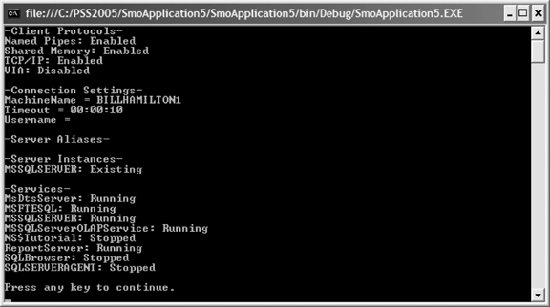 The ManagedComputer class, which represents a WMI installation on a SQL Server instance, has an overloaded constructor. The overload used in the preceding example takes no arguments and initializes a new instance for the default SQL Server instance. The other two overloads let you specify the name of the computer to connect to, and optionally a login name and password. The ManagedComputer class exposes WMI functionality through the set of properties described in Table 13-1.
Four collections accessed through properties of the ManagedComputer class allow access to most WMI functionality. These collections expose the objects described further in Table 13-2.
The SMO classes for WMI are described in Table 13-3.
13.1.2. Creating a Server AliasThis example demonstrates how to create new SMO WMI objects. The example creates a new server alias on the local SQL Server instance. It does so by instantiating a new ServerAlias object, associating it with the ManagedComputer object that represents WMI, and then invoking the Create( ) method of ServerAlias.
    using System;
    using System.Data;

    using Microsoft.SqlServer.Management.Common;
    using Microsoft.SqlServer.Management.Smo;
    using Microsoft.SqlServer.Management.Smo.Wmi;

    class Program
    {
        static void Main(string[] args)
        {
            ManagedComputer mc = new ManagedComputer(  );

            ServerAlias sa = new ServerAlias(  );
            sa.ConnectionString = "1433";
            sa.Name = "PSS2005 Alias";
            sa.Parent = mc;
            sa.ProtocolName = "tcp";
            sa.ServerName = "locahost";
            sa.Create(  );

            Console.WriteLine(Environment.NewLine + "Press any key to continue.");
            Console.ReadKey(  );
        }
    }
Figure 13-3 shows the new alias using the SQL Server Configuration Manager tool (Start Figure 13-3. Creating a server alias results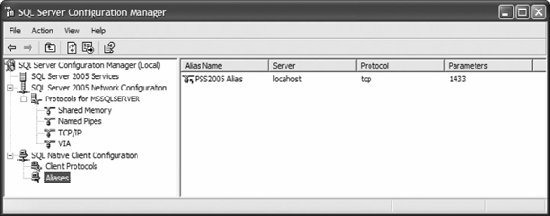 13.1.3. Starting and Stopping a ServiceThis example shows how to stop and start a service by stopping and restarting SQL Server Reporting Services:
    using System;
    using System.Data;

    using Microsoft.SqlServer.Management.Common;
    using Microsoft.SqlServer.Management.Smo;
    using Microsoft.SqlServer.Management.Smo.Wmi;
    using System.Threading;

    class Program
    {
        static void Main(string[] args)
        {
            ManagedComputer mc = new ManagedComputer(  );

            Service
 s = mc.Services["ReportServer"];
            Console.WriteLine("ReportServer status: " + s.ServiceState);

            s.Stop(  );
            Thread.Sleep(10000);
            s.Refresh(  );
            Console.WriteLine("ReportServer status: " + s.ServiceState);
            s.Start(  );
            Thread.Sleep(10000);
            s.Refresh(  );
            Console.WriteLine("ReportServer status: " + s.ServiceState);

            Console.WriteLine(Environment.NewLine + "Press any key to continue.");
            Console.ReadKey(  );
        }
    }
Results are shown in Figure 13-4. Figure 13-4. Results from stopping and starting service example The Service class has methods to control the state of a serviceStart( ), Pause( ), Resume( ), and Stop( ). The AcceptsPause and AcceptsStop properties should be checked before calling Pause( ) or Stop( ) to ensure that the service can be paused or stopped. The example uses the static Sleep( ) method of the THRead class to pause for 10 seconds to allow the service state change operations to complete. The Refresh( ) method of the Service class refreshes the SQL Server service to ensure the status is current.  |
|
|
Ajax toolkit
Ajax tutorials
 Microsoft SQL Server 2005